If you run a WooCommerce store and want to offer gift wrapping without writing a single line of code, you’re in luck. You don’t need a developer, a custom theme, or a paid extension.
A free plugin can add gift wrapping options directly to your product pages, let customers pick their wrap style, and charge extra for it – all in about ten minutes.
The plugin I’d recommend first is WowAddons – its free version includes all the custom fields you need and conditional logic, which is the feature that actually makes gift wrapping feel smooth instead of cluttered.
This guide walks you through exactly how to set it up, compare it against the other free options, and avoid the mistakes that turn a nice feature into a support headache.
Why Gift Wrapping Actually Matters for Your Store
Gift wrapping isn’t just a nice-to-have. It’s a conversion tool, a revenue booster, and a trust signal all at once. Here’s why most store owners add it eventually.
The gifting mindset – why customers expect this option
People buy gifts year-round, not just at Christmas. Birthdays, anniversaries, Valentine’s Day, graduation – the list goes on. When a customer is buying for someone else, they’re already in a different headspace.
They’re not just checking price and specs. They’re thinking about how the product arrives. According to a Forbes research, 82 percent of customers prefer to buy gifts online. That’s not a niche audience. That’s most of your traffic during key buying weeks.
An online gift-wrapping option tells them you get it. You’re making their life easier, not harder. The gifting mindset isn’t seasonal, and neither should your store’s attention to it be.
Seasonal sales spikes and impulse gifting
The fourth quarter is where gift wrapping pays for itself ten times over. Black Friday, Cyber Monday, Christmas – these are the weeks when people buy gifts for everyone at once.
Last-minute shoppers especially appreciate a one-click wrap option. But the revenue lift isn’t only seasonal. Mother’s Day, Valentine’s Day, and even random mid-year birthdays create recurring gift-shopping moments you can tap into any time.
Higher average order value (the math is simple)
Charging even a small fee for gift wrapping adds directly to your average order value. If you charge $3 per wrap and 20 percent of your customers opt in, that’s a clean bump to your revenue without acquiring a single new buyer.
It’s one of the easiest upsells you can build because the customer already wants it – you’re just making it easy to say yes.
For ecommerce physical goods, upsell conversion rates average 18.7 percent, with top-performing stores hitting 29.4 percent, according to a report from Focus Digital. Gift wrapping is explicitly listed among the top-performing upsell products in that category.
Differentiation from competitors
Most online stores don’t offer gift wrapping. When a customer sees that you do, it sets you apart instantly. It feels thoughtful, and that perception of care carries over to how they view your brand overall.
You’re not just selling a product. You’re selling the experience of receiving something that looks like it was prepared with intention.
Research from Packaging Digest found that 40 percent of shoppers would choose to buy from a store that offers premium packaging. That’s a substantial slice of the market that’s actively looking for exactly what you could be providing.
Free Plugin to Add Gift Wrapping on WooCommerce
There are several free plugins that let you add gift wrapping options to WooCommerce. The three most common ones are WowAddons, YITH WooCommerce Product Add-Ons, and Advanced Product Fields for WooCommerce by Studio Wombat.
Which one should you choose? For most store owners, WowAddons is the best starting point. Its free version includes 25 custom fields, which is the most number among these 3 plugins. Also, it has a really intuitive, drag-anddrop addon builder which is very helpful for beginners.
Most importantly, it offers an amazing lfietime deal, so you don’t need to spend hundreds of dollars each year. So, in this article, we will use WowAddons plugin to add gift wrapping options.
Step-by-Step: Add Gift Wrapping to Product Pages
Everything below uses WowAddons’ free version. If you upgrade later, the process is the same – you just unlock more field types and styling options.
Install the free plugin
Head to your WordPress dashboard and go to Plugins > Add New. Search for “WowAddons”. Click *Install Now*, then *Activate*. The whole thing takes under a minute.
Once activated, you’ll see a new WowAddons dashboard. That’s your home base for everything — creating addon groups, assigning them to products, and managing field types.
Create a gift wrapping field group
From the WowAddons dashboard, create a new addon group and name it something like “Gift Wrapping.” This group will hold all the fields your customers interact with when they want their order wrapped. Think of it as a container for the entire gift wrap experience.
Here you’ll add three key fields:
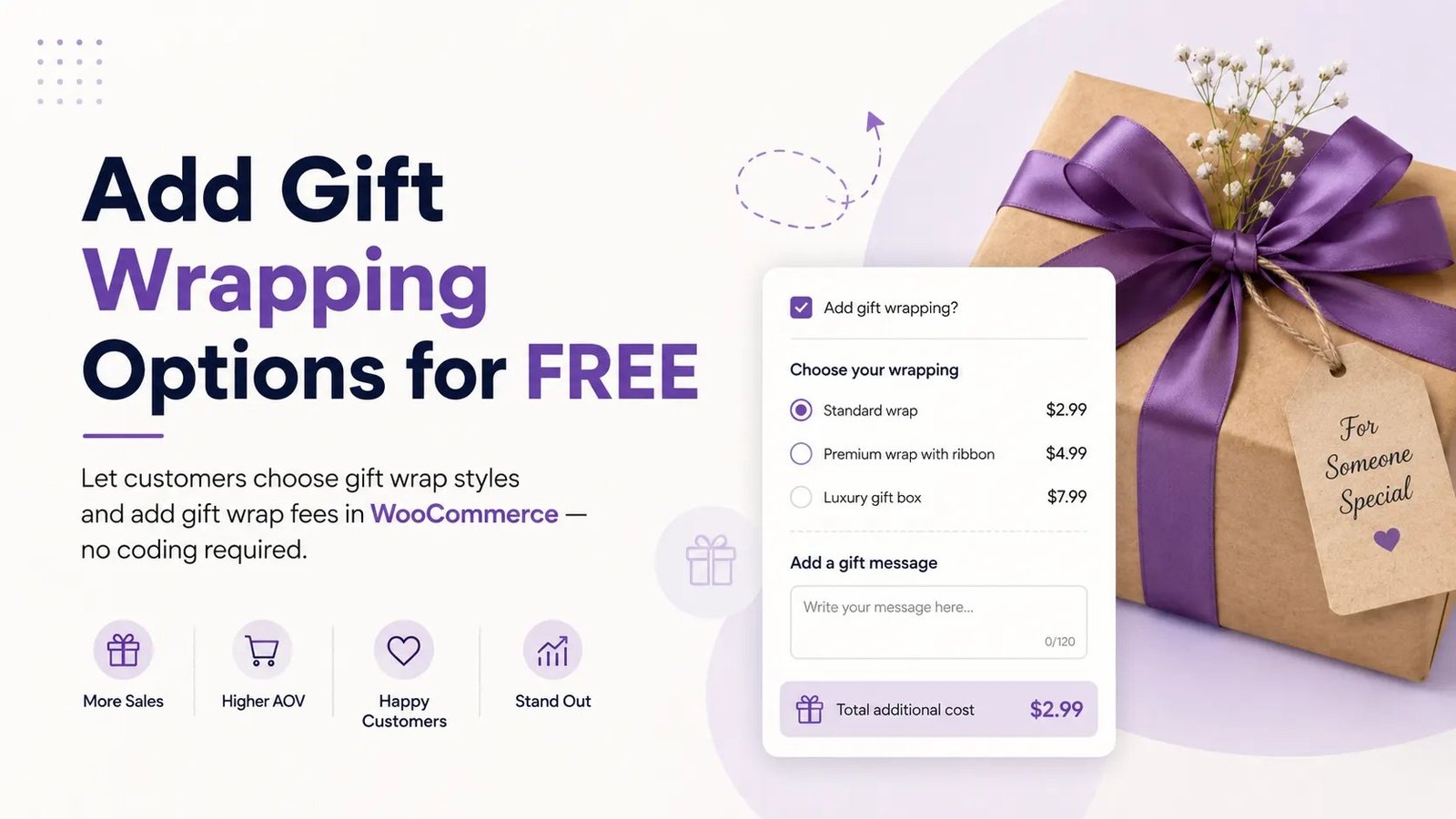
Add a checkbox: ‘Add gift wrapping?’
Add a checkbox field and label it “Add gift wrapping?” or “Yes, gift wrap my order.” Customers who want wrapping tick it. Customers who don’t, ignore it.
Because this is a checkbox, it stays unobtrusive on the product page — no clutter for people who aren’t buying a gift.
Set this field as optional unless you want wrapping to be mandatory for specific products. Most stores keep it optional.
Add radio options for wrap type with different prices
Add a radio field for the wrap style or type. Name it something like “Choose your wrapping” and add options such as:
- Standard wrap — $2.99
- Premium wrap with ribbon — $4.99
- Luxury gift box — $7.99
Give each option a clear label and a price. The price you set here adds directly to the product total at checkout. You can also use the Same Pricing for Multiple Options feature if all wrap types cost the same amount.
Set radio buttons as required if you want customers to pick a style after they’ve opted in. That way you never get a “gift wrap” order with no actual wrap type selected.
Set conditional logic: show wrap options only when checkbox is checked
This is the step that makes the whole thing feel professional. In your radio button field settings, go to the Conditional Logic tab.
Enable it, set visibility to “Show,” and create a rule that says: show this field when the “Add gift wrapping?” checkbox equals “checked.”
Now the radio options are hidden by default. A customer only sees them after ticking the gift wrap box. No extra fields cluttering the product page for people who just want the product.
That’s the power of conditional logic, and WowAddons includes it for free.
Assign the field group to specific products or categories
From the addon builder, choose which products you want to apply the product options. You can attach the gift wrap group to:
- All products — every product on your store gets the wrap option
- Specific categories — only products in selected categories (e.g., jewelry, apparel, subscription boxes)
- Individual products — cherry-pick exactly which products offer wrapping
- Exclude specific categories or products when applying globally
Most stores start narrow — assign it to one or two categories and test. If it converts well, expand it to more products. That way you’re not overwhelming your entire catalog with a new option before you know it works.
Test on the frontend — verify pricing adds to cart correctly
Open a product page on the frontend of your store and walk through the flow:
- Confirm the checkbox appears near the Add to Cart button
- Tick it — the radio wrap options should appear with their prices visible
- Select a wrap style and add the product to cart
- Check the cart: the wrap price should be listed separately as an add-on line item
- Go to checkout: confirm the total includes the wrap fee, and the order summary shows it clearly
If anything breaks — prices not adding, fields staying hidden, styling breaking — fix it before showing it live on the product pages.
How to Charge for Gift Wrapping — Strategies to Follow
How you price gift wrapping changes how customers perceive it. Here are the most common approaches, and when to use each.
Flat fee per order
Charge a single flat fee no matter how many items are in the cart. This is the simplest model and works well for stores with small average orders. A $4.99 flat wrap fee is easy to understand and easy to say yes to. The downside: a customer buying ten items pays the same as someone buying one, which can feel unfair at higher quantities.
Per-item fee
Charge per wrapped item. If someone orders three gifts, they pay the wrap fee three times. This is more accurate — you’re literally wrapping each product separately — and it scales naturally with order size. WowAddons handles this naturally since each product’s add-on price applies individually.
Percentage of order total
Charge a percentage instead of a fixed amount. If your average order varies a lot, this keeps the wrap fee proportional. A 3 percent fee on a $30 order is under a dollar, while 3 percent on a $300 order is $9. This works well for high-ticket stores where a flat fee would either be too cheap to be worth it or too expensive to be fair.
Design-specific pricing
If you offer multiple wrap designs (standard paper, premium paper, gift box with ribbon), price each one differently. The basic option stays cheap to lower the barrier to entry. The premium option carries a higher margin and appeals to customers who want the full experience.
Common Mistakes to Avoid
These are the things I see store owners get wrong when they first add gift wrapping. Skip them and you’ll have a much smoother launch.
Making the gift wrap option mandatory on all products
Not everyone is buying a gift. If every product page forces a wrap decision, you’re annoying customers who just want the product. Keep it optional by default. Mandatory wrapping only makes sense for products that are inherently gift-oriented — like subscription boxes or seasonal bundles — and even then, test it first.
Charging without showing the price upfront
Transparency matters. If a customer only finds out there’s a $5 wrap fee at checkout, they’ll feel tricked. Show the price right next to the wrap option on the product page. When the customer knows exactly what they’re paying before they commit, they’re more likely to say yes, not less.
Forgetting to handle zero-priced/free products
If you give away free products — samples, digital downloads, promotional items — make sure your gift wrap field group doesn’t apply to those. Charging a wrap fee on a free product creates a terrible experience and looks broken. Use WowAddons’ category or product exclusions to keep wrapping off your free listings.
Not testing with different product types
A gift wrap option that works fine on a simple product might behave oddly on a variable product or a grouped product. Test each type you sell. Check that the wrap price adds correctly when a customer picks a product variation, and that the conditional logic still fires after they select a size or color.
Cluttering the product page with too many add-on options
Gift wrapping is great. Engraving, custom messages, express delivery, gift boxes, and add-on insurance are also great — but not all on the same product page at once. Pick the add-ons that matter most for each product and leave the rest out. WowAddons’ conditional logic is meant to keep things clean. Use it.
Summing Up
Adding gift wrapping to WooCommerce doesn’t require paying for a premium plugin or writing custom code. WowAddons gives you the core features — conditional logic, multiple field types, flexible assignment – completely free.
Install it, build a simple checkbox-plus-radio group, assign it to your most giftable products, and test it once.
If your store grows and you need more control later, the Pro upgrades for all three plugins in our comparison add templates and advanced styling. But the basics are solid in the free versions. Start small, measure whether customers use it, and expand from there.
The stores that get this right don’t just make extra money – they build a reputation for being thoughtful.